Welcome to LZN's Blog!
Wind extinguishes a candle but energizes fire.-
【CESM】B compset CAM5_PM设置
Since we don’t care about the chemical process when investigate the physical climate system, we hope to turn off the prognostic chemistry model and used prescribed modal aerosols in CAM5. For F compset, it is easy because a specific PM compset without active chemistry model has been provided by CESM. For B compset, there is no option like this.
Therefore, we try to capture the differences in FC5PM and FC5. We first see the differences in output flow after create_newcase command.
6c6
<   2000_CAM5_CLM40%SP_CICE%PRES_DOCN%DOM_RTM_SGLC_SWAV (F_2000_CAM5) (FC5)
---
>   2000_CAM5%PM_CLM40%SP_CICE%PRES_DOCN%DOM_RTM_SGLC_SWAV (F_2000_CAM5_PM) (FC5PM)
8c8
<   CAM: CLM: RTM: CICE: DOCN: SGLC: SWAV: present day: cam5 physics: clm4.0 physics: clm4.0 Satellite phenology: prescribed cice: docn data mode:
---
>   CAM: CLM: RTM: CICE: DOCN: SGLC: SWAV: present day: cam5 physics: CAM prescribed modal aerosols: clm4.0 physics: clm4.0 Satellite phenology: prescribed cice: docn data mode:
23c23
<   CAM_CONFIG_OPTS: -phys cam5
---
>   CAM_CONFIG_OPTS: -phys cam5 -chem none
58,63c58,63
< Creating /WORK/sysu_hjkx_ys/L_Zealot/cesm/F/CAM5_CHEM
< Created /WORK/sysu_hjkx_ys/L_Zealot/cesm/F/CAM5_CHEM/env_case.xml
< Created /WORK/sysu_hjkx_ys/L_Zealot/cesm/F/CAM5_CHEM/env_mach_pes.xml
< Created /WORK/sysu_hjkx_ys/L_Zealot/cesm/F/CAM5_CHEM/env_build.xml
< Created /WORK/sysu_hjkx_ys/L_Zealot/cesm/F/CAM5_CHEM/env_run.xml
< Locking file /WORK/sysu_hjkx_ys/L_Zealot/cesm/F/CAM5_CHEM/env_case.xml
---
> Creating /WORK/sysu_hjkx_ys/L_Zealot/cesm/F/CAM5_NO_CHEM
> Created /WORK/sysu_hjkx_ys/L_Zealot/cesm/F/CAM5_NO_CHEM/env_case.xml
> Created /WORK/sysu_hjkx_ys/L_Zealot/cesm/F/CAM5_NO_CHEM/env_mach_pes.xml
> Created /WORK/sysu_hjkx_ys/L_Zealot/cesm/F/CAM5_NO_CHEM/env_build.xml
> Created /WORK/sysu_hjkx_ys/L_Zealot/cesm/F/CAM5_NO_CHEM/env_run.xml
> Locking file /WORK/sysu_hjkx_ys/L_Zealot/cesm/F/CAM5_NO_CHEM/env_case.xml
Clearly, a PM option has been added to the CAM5 component. We try put this full name to B compset.
Things never get so smooth~
set_compset: no match for compset 2000_CAM5%PM_CLM40%SP_CICE_POP2_RTM_SGLC_SWAV
            to see supported compsets issue
It seems that we have to change it in the specific configuration file.
We then try to seek the differences in xml files. In env_build.xml, we found an interesting differences:
40c40
< <entry id="EXEROOT" value="/HOME/sysu_hjkx_ys/WORKSPACE/L_Zealot/cesm/F/F2000_F09_CAM5_CTRL/bld" />
---
> <entry id="EXEROOT" value="/HOME/sysu_hjkx_ys/WORKSPACE/L_Zealot/cesm/F/F2000_F09_CAM5PM_CTRL/bld" />
72c72
< <entry id="CAM_CONFIG_OPTS" value="-phys cam5" />
---
> <entry id="CAM_CONFIG_OPTS" value="-phys cam5 -chem none" />
That is fine. We then add argument “-chem none” to the env_build.xml in B2000CAM5 case, setup and build, smoothly!
Now we come to the atm_in differences between FC5 and FC5PM
1,3c1,8
< &aerosol_nl
< dust_emis_fact = 0.35D0
< soil_erod = '/HOME/sysu_hjkx_ys/WORKSPACE/cesm/input/atm/cam/dst/dst_0.9x1.25_c100121.nc'
---
> &aerodep_flx_nl
> aerodep_flx_cycle_yr = 2000
> aerodep_flx_datapath = '/HOME/sysu_hjkx_ys/WORKSPACE/cesm/input/atm/cam/chem/trop_mam/aero'
> aerodep_flx_file = 'mam3_1.9x2.5_L30_2000clim_c130319.nc'
> aerodep_flx_specifier = 'bc_a1DDF', 'bc_c1DDF', 'pom_a1DDF', 'pom_c1DDF', 'soa_a1DDF', 'soa_c1DDF', 'soa_a2DDF', 'soa_c2DDF',
> 'dst_a1DDF', 'dst_c1DDF', 'dst_a3DDF', 'dst_c3DDF', 'bc_a1SFWET', 'bc_c1SFWET', 'pom_a1SFWET', 'pom_c1SFWET',
> 'soa_a1SFWET', 'soa_c1SFWET', 'dst_a1SFWET', 'dst_c1SFWET', 'dst_a3SFWET', 'dst_c3SFWET'
> aerodep_flx_type = 'CYCLICAL'
10d14
< print_energy_errors = .false.
16,34d19
< aer_drydep_list = 'bc_a1', 'dst_a1', 'dst_a3', 'ncl_a1', 'ncl_a2', 'ncl_a3', 'num_a1', 'num_a2', 'num_a3', 'pom_a1', 'so4_a1',
< 'so4_a2', 'so4_a3', 'soa_a1', 'soa_a2'
< aer_wetdep_list = 'bc_a1', 'dst_a1', 'dst_a3', 'ncl_a1', 'ncl_a2', 'ncl_a3', 'num_a1', 'num_a2', 'num_a3', 'pom_a1', 'so4_a1',
< 'so4_a2', 'so4_a3', 'soa_a1', 'soa_a2'
< clim_soilw_file = '/HOME/sysu_hjkx_ys/WORKSPACE/cesm/input/atm/cam/chem/trop_mozart/dvel/clim_soilw.nc'
< depvel_file = '/HOME/sysu_hjkx_ys/WORKSPACE/cesm/input/atm/cam/chem/trop_mozart/dvel/depvel_monthly.nc'
< depvel_lnd_file = '/HOME/sysu_hjkx_ys/WORKSPACE/cesm/input/atm/cam/chem/trop_mozart/dvel/regrid_vegetation.nc'
< exo_coldens_file = '/HOME/sysu_hjkx_ys/WORKSPACE/cesm/input/atm/cam/chem/trop_mozart/phot/exo_coldens.nc'
< ext_frc_specifier = 'SO2 -> /HOME/sysu_hjkx_ys/WORKSPACE/cesm/input/atm/cam/chem/trop_mozart_aero/emis/ar5_mam3_so2_elev_2000_c090726.nc',
< 'bc_a1 -> /HOME/sysu_hjkx_ys/WORKSPACE/cesm/input/atm/cam/chem/trop_mozart_aero/emis/ar5_mam3_bc_elev_2000_c090726.nc',
< 'num_a1 -> /HOME/sysu_hjkx_ys/WORKSPACE/cesm/input/atm/cam/chem/trop_mozart_aero/emis/ar5_mam3_num_a1_elev_2000_c090726.nc',
< 'num_a2 -> /HOME/sysu_hjkx_ys/WORKSPACE/cesm/input/atm/cam/chem/trop_mozart_aero/emis/ar5_mam3_num_a2_elev_2000_c090726.nc',
< 'pom_a1 -> /HOME/sysu_hjkx_ys/WORKSPACE/cesm/input/atm/cam/chem/trop_mozart_aero/emis/ar5_mam3_oc_elev_2000_c090726.nc',
< 'so4_a1 -> /HOME/sysu_hjkx_ys/WORKSPACE/cesm/input/atm/cam/chem/trop_mozart_aero/emis/ar5_mam3_so4_a1_elev_2000_c090726.nc',
< 'so4_a2 -> /HOME/sysu_hjkx_ys/WORKSPACE/cesm/input/atm/cam/chem/trop_mozart_aero/emis/ar5_mam3_so4_a2_elev_2000_c090726.nc'
< ext_frc_type = 'CYCLICAL'
< fstrat_list = ' '
< rsf_file = '/HOME/sysu_hjkx_ys/WORKSPACE/cesm/input/atm/waccm/phot/RSF_GT200nm_v3.0_c080416.nc'
< season_wes_file = '/HOME/sysu_hjkx_ys/WORKSPACE/cesm/input/atm/cam/chem/trop_mozart/dvel/season_wes.nc'
36,54d20
< srf_emis_specifier = 'DMS -> /HOME/sysu_hjkx_ys/WORKSPACE/cesm/input/atm/cam/chem/trop_mozart_aero/emis/aerocom_mam3_dms_surf_2000_c090129.nc',
< 'SO2 -> /HOME/sysu_hjkx_ys/WORKSPACE/cesm/input/atm/cam/chem/trop_mozart_aero/emis/ar5_mam3_so2_surf_2000_c090726.nc',
< 'SOAG -> /HOME/sysu_hjkx_ys/WORKSPACE/cesm/input/atm/cam/chem/trop_mozart_aero/emis/ar5_mam3_soag_1.5_surf_2000_c100217.nc',
< 'bc_a1 -> /HOME/sysu_hjkx_ys/WORKSPACE/cesm/input/atm/cam/chem/trop_mozart_aero/emis/ar5_mam3_bc_surf_2000_c090726.nc',
< 'num_a1 -> /HOME/sysu_hjkx_ys/WORKSPACE/cesm/input/atm/cam/chem/trop_mozart_aero/emis/ar5_mam3_num_a1_surf_2000_c090726.nc',
< 'num_a2 -> /HOME/sysu_hjkx_ys/WORKSPACE/cesm/input/atm/cam/chem/trop_mozart_aero/emis/ar5_mam3_num_a2_surf_2000_c090726.nc',
< 'pom_a1 -> /HOME/sysu_hjkx_ys/WORKSPACE/cesm/input/atm/cam/chem/trop_mozart_aero/emis/ar5_mam3_oc_surf_2000_c090726.nc',
< 'so4_a1 -> /HOME/sysu_hjkx_ys/WORKSPACE/cesm/input/atm/cam/chem/trop_mozart_aero/emis/ar5_mam3_so4_a1_surf_2000_c090726.nc',
< 'so4_a2 -> /HOME/sysu_hjkx_ys/WORKSPACE/cesm/input/atm/cam/chem/trop_mozart_aero/emis/ar5_mam3_so4_a2_surf_2000_c090726.nc'
< srf_emis_type = 'CYCLICAL'
< tracer_cnst_cycle_yr = 2000
< tracer_cnst_datapath = '/HOME/sysu_hjkx_ys/WORKSPACE/cesm/input/atm/cam/chem/trop_mozart_aero/oxid'
< tracer_cnst_file = 'oxid_1.9x2.5_L26_1850-2005_c091123.nc'
< tracer_cnst_filelist = 'oxid_1.9x2.5_L26_clim_list.c090805.txt'
< tracer_cnst_specifier = 'O3','OH','NO3','HO2'
< tracer_cnst_type = 'CYCLICAL'
< use_cam_sulfchem = .false.
< xactive_prates = .false.
< xs_long_file = '/HOME/sysu_hjkx_ys/WORKSPACE/cesm/input/atm/waccm/phot/temp_prs_GT200nm_jpl06_c080930.nc'
61d26
< flbc_list = ' '
114c79
< cam_chempkg = 'trop_mam3'
---
> cam_chempkg = 'none'
137a103,114
> &prescribed_aero_nl
> prescribed_aero_cycle_yr = 2000
> prescribed_aero_datapath = '/HOME/sysu_hjkx_ys/WORKSPACE/cesm/input/atm/cam/chem/trop_mam/aero'
> prescribed_aero_file = 'mam3_1.9x2.5_L30_2000clim_c130319.nc'
> prescribed_aero_specifier = 'num_c1', 'bc_c1', 'dst_c1', 'ncl_c1', 'pom_c1', 'so4_c1', 'soa_c1', 'num_c2',
> 'ncl_c2', 'so4_c2', 'soa_c2', 'num_c3', 'dst_c3', 'ncl_c3', 'so4_c3', 'num_a1_logm',
> 'bc_a1_logm', 'dst_a1_logm', 'ncl_a1_logm', 'pom_a1_logm', 'so4_a1_logm', 'soa_a1_logm', 'num_a2_logm', 'ncl_a2_logm',
> 'so4_a2_logm', 'soa_a2_logm', 'num_a3_logm', 'dst_a3_logm', 'ncl_a3_logm', 'so4_a3_logm', 'num_a1_logv', 'bc_a1_logv',
> 'dst_a1_logv', 'ncl_a1_logv', 'pom_a1_logv', 'so4_a1_logv', 'soa_a1_logv', 'num_a2_logv', 'ncl_a2_logv', 'so4_a2_logv',
> 'soa_a2_logv', 'num_a3_logv', 'dst_a3_logv', 'ncl_a3_logv', 'so4_a3_logv'
> prescribed_aero_type = 'CYCLICAL'
> /
150,158c127,135
< mode_defs = 'mam3_mode1:accum:=', 'A:num_a1:N:num_c1:num_mr:+',
< 'A:so4_a1:N:so4_c1:sulfate:/HOME/sysu_hjkx_ys/WORKSPACE/cesm/input/atm/cam/physprops/sulfate_rrtmg_c080918.nc:+', 'A:pom_a1:N:pom_c1:p-organic:/HOME/sysu_hjkx_ys/WORKSPACE/cesm/input/atm/cam/physprops/ocpho_rrtmg_c101112.nc:+',
< 'A:soa_a1:N:soa_c1:s-organic:/HOME/sysu_hjkx_ys/WORKSPACE/cesm/input/atm/cam/physprops/ocphi_rrtmg_c100508.nc:+', 'A:bc_a1:N:bc_c1:black-c:/HOME/sysu_hjkx_ys/WORKSPACE/cesm/input/atm/cam/physprops/bcpho_rrtmg_c100508.nc:+',
< 'A:dst_a1:N:dst_c1:dust:/HOME/sysu_hjkx_ys/WORKSPACE/cesm/input/atm/cam/physprops/dust4_rrtmg_c090521.nc:+', 'A:ncl_a1:N:ncl_c1:seasalt:/HOME/sysu_hjkx_ys/WORKSPACE/cesm/input/atm/cam/physprops/ssam_rrtmg_c100508.nc',
< 'mam3_mode2:aitken:=', 'A:num_a2:N:num_c2:num_mr:+',
< 'A:so4_a2:N:so4_c2:sulfate:/HOME/sysu_hjkx_ys/WORKSPACE/cesm/input/atm/cam/physprops/sulfate_rrtmg_c080918.nc:+', 'A:soa_a2:N:soa_c2:s-organic:/HOME/sysu_hjkx_ys/WORKSPACE/cesm/input/atm/cam/physprops/ocphi_rrtmg_c100508.nc:+',
< 'A:ncl_a2:N:ncl_c2:seasalt:/HOME/sysu_hjkx_ys/WORKSPACE/cesm/input/atm/cam/physprops/ssam_rrtmg_c100508.nc', 'mam3_mode3:coarse:=',
< 'A:num_a3:N:num_c3:num_mr:+', 'A:dst_a3:N:dst_c3:dust:/HOME/sysu_hjkx_ys/WORKSPACE/cesm/input/atm/cam/physprops/dust4_rrtmg_c090521.nc:+',
< 'A:ncl_a3:N:ncl_c3:seasalt:/HOME/sysu_hjkx_ys/WORKSPACE/cesm/input/atm/cam/physprops/ssam_rrtmg_c100508.nc:+', 'A:so4_a3:N:so4_c3:sulfate:/HOME/sysu_hjkx_ys/WORKSPACE/cesm/input/atm/cam/physprops/sulfate_rrtmg_c080918.nc'
---
> mode_defs = 'mam3_mode1:accum:=', 'N:num_a1:N:num_c1:num_mr:+',
> 'N:so4_a1:N:so4_c1:sulfate:/HOME/sysu_hjkx_ys/WORKSPACE/cesm/input/atm/cam/physprops/sulfate_rrtmg_c080918.nc:+', 'N:pom_a1:N:pom_c1:p-organic:/HOME/sysu_hjkx_ys/WORKSPACE/cesm/input/atm/cam/physprops/ocpho_rrtmg_c101112.nc:+',
> 'N:soa_a1:N:soa_c1:s-organic:/HOME/sysu_hjkx_ys/WORKSPACE/cesm/input/atm/cam/physprops/ocphi_rrtmg_c100508.nc:+', 'N:bc_a1:N:bc_c1:black-c:/HOME/sysu_hjkx_ys/WORKSPACE/cesm/input/atm/cam/physprops/bcpho_rrtmg_c100508.nc:+',
> 'N:dst_a1:N:dst_c1:dust:/HOME/sysu_hjkx_ys/WORKSPACE/cesm/input/atm/cam/physprops/dust4_rrtmg_c090521.nc:+', 'N:ncl_a1:N:ncl_c1:seasalt:/HOME/sysu_hjkx_ys/WORKSPACE/cesm/input/atm/cam/physprops/ssam_rrtmg_c100508.nc',
> 'mam3_mode2:aitken:=', 'N:num_a2:N:num_c2:num_mr:+',
> 'N:so4_a2:N:so4_c2:sulfate:/HOME/sysu_hjkx_ys/WORKSPACE/cesm/input/atm/cam/physprops/sulfate_rrtmg_c080918.nc:+', 'N:soa_a2:N:soa_c2:s-organic:/HOME/sysu_hjkx_ys/WORKSPACE/cesm/input/atm/cam/physprops/ocphi_rrtmg_c100508.nc:+',
> 'N:ncl_a2:N:ncl_c2:seasalt:/HOME/sysu_hjkx_ys/WORKSPACE/cesm/input/atm/cam/physprops/ssam_rrtmg_c100508.nc', 'mam3_mode3:coarse:=',
> 'N:num_a3:N:num_c3:num_mr:+', 'N:dst_a3:N:dst_c3:dust:/HOME/sysu_hjkx_ys/WORKSPACE/cesm/input/atm/cam/physprops/dust4_rrtmg_c090521.nc:+',
> 'N:ncl_a3:N:ncl_c3:seasalt:/HOME/sysu_hjkx_ys/WORKSPACE/cesm/input/atm/cam/physprops/ssam_rrtmg_c100508.nc:+', 'N:so4_a3:N:so4_c3:sulfate:/HOME/sysu_hjkx_ys/WORKSPACE/cesm/input/atm/cam/physprops/sulfate_rrtmg_c080918.nc'
191,193d167
< &wetdep_inparm
< gas_wetdep_list = 'H2O2','SO2'
< /
Such a lot differences in input files as we expected.
We test the atm_in differences between B with / without “-chem none” argument, everything goes fine!
Now we run the model for several months to test the final results.
Configuration:
B2000_CAM5
0.9x1.25
Tianhe-2: 192PEs
output with” phys cam5 -chem none”:
 -rw-r--r-- 1 sysu_hjkx_ys sysu_hjkx 299965072 Sep 24 15:10 B_NO_CHEM_CAM5_TEST.cam.h0.0001-01.nc
-rw-r--r-- 1 sysu_hjkx_ys sysu_hjkx 299965072 Sep 24 15:30 B_NO_CHEM_CAM5_TEST.cam.h0.0001-02.nc
output without “phys cam5”:
-rw-r--r-- 1 sysu_hjkx_ys sysu_hjkx 305056100 Sep 24 15:23 B_CHEM_CAM5_TEST.cam.h0.0001-01.nc
-rw-r--r-- 1 sysu_hjkx_ys sysu_hjkx 305056100 Sep 24 15:49 B_CHEM_CAM5_TEST.cam.h0.0001-02.nc
So without the aerosol active, it saves (49-23)-(30-10) = 6 min in each month. About 6/26*100% = 23% time saved.
-
【已解决】Preferable PE layers for BC5 compset on tianhe2
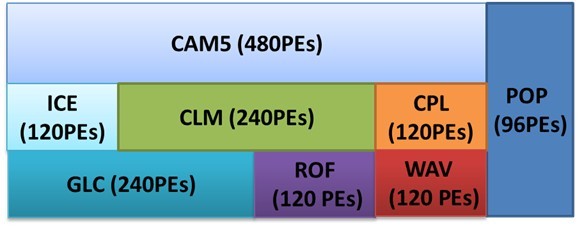
72 #Change PE layers 73 ./xmlchange NTASKS_ATM=480 74 ./xmlchange NTHRDS_ATM=1 75 ./xmlchange ROOTPE_ATM=0 76 77 ./xmlchange NTASKS_LND=240 78 ./xmlchange NTHRDS_LND=1 79 ./xmlchange ROOTPE_LND=120 80 81 ./xmlchange NTASKS_ICE=120 82 ./xmlchange NTHRDS_ICE=1 83 ./xmlchange ROOTPE_ICE=0 84 85 ./xmlchange NTASKS_OCN=96 86 ./xmlchange NTHRDS_OCN=1 87 ./xmlchange ROOTPE_OCN=480 88 89 ./xmlchange NTASKS_CPL=120 90 ./xmlchange NTHRDS_CPL=1 91 ./xmlchange ROOTPE_CPL=360 92 93 ./xmlchange NTASKS_GLC=240 94 ./xmlchange NTHRDS_GLC=1 95 ./xmlchange ROOTPE_GLC=0 96 97 ./xmlchange NTASKS_ROF=120 98 ./xmlchange NTHRDS_ROF=1 99 ./xmlchange ROOTPE_ROF=240 100 101 ./xmlchange NTASKS_WAV=120 102 ./xmlchange NTHRDS_WAV=1 103 ./xmlchange ROOTPE_WAV=360
-
【已解决】NCL脚本的参数传递
When used in conjunction with an NCL script, command line arguments can set a variable’s value, help determine initial conditions, and so forth:
% cat modelRun.ncl
begin
  [...]

  if (.not. isvar("nyrStrt")) then      ; is nyrStrt on command line?
      nyrSrt = 1960
  end if

  if (.not. isvar("nyrLast")) then      ; is nyrLast on command line?
      nyrLast = 2002;
  end if

  print(nyrStrt)                        ; for illustrative purposes
  print(nyrLast)

  [...]
end
(Variables nyrStrt and nyrLast are set on the command line)
% ncl nyrStrt=1900 nyrLast=1968 modelRun.ncl

Variable: nyrStrt
Type: integer
Total Size: 4 bytes
            1 values
Number of Dimensions: 1
Dimensions and sizes:   [1]
Coordinates:
(0)     1900


Variable: nyrStrt
Type: integer
Total Size: 4 bytes
            1 values
Number of Dimensions: 1
Dimensions and sizes:   [1]
Coordinates:
(0)     1968
Consider the following
ncl nyrStrt=1930 'fName="Model*"' gravity=9.8 opt=True cyclic=False latS=-30 latN=30 lonL=130 lonR=290 modelRun.ncl
When the number of CLOs is large, it might be clearer to enter only one or two per line. The Unix line continuation character, </b>, can be used to accomplish this:
 ncl nyrStrt=1930      \
     'fName="Model*"'  \
     gravity=9.8       \
     latS=-30 latN=30  \
     lonL=130 lonR=290 \
     modelRun.ncl
- 【e/acc】AI奇点 | 物理学家、e/acc运动创始人Guillaume Verdon与Lex Fridman播客实录 | 中英文完整版精译 IV(完结篇)
- 【e/acc】外星智能、卡尔达肖夫天梯、技术资本机器 | 物理学家、e/acc运动创始人Guillaume Verdon与Lex Fridman播客实录 | 中英文完整版精译 Part3
- 【e/acc】有效加速主义、量子热力学与AI未来 | 物理学家、e/acc运动创始人Guillaume Verdon与Lex Fridman播客实录 | 中英文完整版精译 II
- 【e/acc】有效加速主义、量子热力学与AI未来 | 物理学家、e/acc运动创始人Guillaume Verdon与Lex Fridman播客实录 | 中英文完整版精译 I
- 【酒后真言】AI工厂、物理智能:英伟达CEO黄仁勋与思科CEO Chuck Robbins炉边对话 | 中英文完整版精译
- 超级智能、顺从型AI、超人类主义、基督与超越:PayPal、Palantir联合创始人彼得·蒂尔2025年6月播客实录 | 中英文完整版精译(下篇)
- 技术停滞、回到未来、风险承担 | PayPal、Palantir联合创始人彼得·蒂尔2025年6月播客实录 | 中英文完整版精译 (上篇)
- 与外星人进行贸易,应该用什么货币?
- 2026年投资展望:Year of D——持盈保泰,因利制权
- R星创始人、《侠盗猎车手》与《荒野大镖客》创作者丹·豪瑟2025年11月播客实录 | 中英文完整版精译 Part3